email 200 – How NOT to be a Spammer

Today’s blog is a follow up to email 110 – DNS – the Domain Name System

DNS (again)
Here I go harping on that DNS thing again. I can’t express enough how important DNS to the high volume sender. While just understanding how it works is enough for anyone who sends and receives a few emails a day, the high volume sender needs to understand it completely. There are many things you can do with DNS that will help you be more efficient sending mail. Some of those follow here.

DKIM
Domain Keys Identified Mail is a system of “signing” a message with a fingerprint that can only be connected to you. If a receiver get’s your email and it has a DKIM signature, they can look that up in DNS and use it to verify that it was really sent by you. If it was not, then they have the option of rejecting the mail or marking it as possible spam. The way this works is with a pair of cryptographic keys – one is private and the other public. The private key is used to encrypt special information from your server right into the email headers (from part 1). The public key is published in DNS so when a receiver gets your mail, they can use your public key from DNS, to decrypt the signature and verify that the mail really did come from your server.

In DNS, the DKIM entry will look something like this:
d1024._domainkey.example.com. 86400 IN TXT “v=dkim1; k=rsa; h=sha1; t=y; p=MHxwu28eddw…QaB”

When someone at example.com sends a DKIM signed email, a receiver like Yahoo will look to DNS for a “_domainkey” entry in example.com’s DNS file. The public key in the “p=” part will be used to decrypt the signature. If it is successful, the mail is marked as “passed”.

FBL
Feed Back Loops are best represented by the “This Is Spam” button Yahoo, Hotmail and AOL mail browsers have. A responsible high volume sender can apply for FBL status with many of the larger ISPs but they need to use a different domain name and reporting address. When an end user clicks the “This Is Spam” button, the ISP will generate a new email and send it to the domain listed in DNS. This is actually a special type of mail know as “ARF” or Abuse Reporting Format and is often processed automatically by an abuse reporting system in the sender’s network. An FBL mail is NOT a bounce, it is a new email that is generated in response to an end user manually pressing a “This is Spam” button in their email reader. For this reason, you cannot normally rely on getting all of the original message back. Many ISPs will redact any personally identifying information including the email address form the returned email. A bulk sender participating an FBL program will have to use some intelligent processing to manage FBL responses.

SPF
Sender Policy Framework is similar to DKIM in the sense that an ISP can use it to validate the source of the mail. It does not use any kind of cryptographic signing, but rather lists all of the IP addresses that are associated with a mail host (MX) name. This way, a receiver can check in DNS when a mail is received and look up to see if the IP address that sent the email matches the IP addresses listed in DNS for the mail that was sent. If not, it was most likely spam and could potentially be discarded or marked as spam.

SenderID
SenderID is almost synonymous with SPF, but is a slightly different version – you can never have too much security.

WhiteListing
This is a process of simply being a good neighbour in the high volume sending community. When you request whitelisting from an ISP like Yahoo for example, you have to provide proof that you have done all the right things in DNS like SPF and DKIM. You also have to prove that you are a legitimate sender and not a spammer. When they are satisfied that you are one of the good guys, they will list your mail server IPs as “friendly” and will let mail pass though with less security checking – you become a “trusted traveler”. This is not necessarily permanent and one offensive mailing can remove you from the list.

Content prescreening with Spamassassin
When an end user clicks on “This is Spam” it is an instant mark against you in the reputation battle. Some ISPs use content scanning and logic to make decisions about what may be obvious spam. These are both very good reasons for content scanning your own messages before sending. This can be done relatively easily with Spamassassin and you will get a score with detail to give you an idea of ways to improve. While no ISP actually uses Spamassassin, they all used some form of ranking that is similar. Odds are that if Spamassassin gives you a score of 10 or more, the ISP will mark it as spam and you mail may never see the inbox.

Double Opt-In vs Purchased Lists
One big factor that can really affect your reputation as a sender is the quality of the email address list you send to. While it is tempting to purchase email address lists for sending to, this can be a dangerous practice. There are some legitimate list vendors out there, but there are also those who will sell you bad lists filled with invalid addresses, spam straps (addresses that are known to be bad and watched by ISPs, and forbidden addresses. Sending mail to any of those can hurt or kill your reputation. One way to avoid that is to double opt-in your own list. First allow people to submit their email address to a web form if they want your information. Then send them a short email asking them to click a verification link if they really did ask for the information – ala double opt-in.

ESPs
One great option for people who have a lot of mail to send, but don’t want to manage their own mail servers, is an ESP (Email Service Provider). ESPs can often provide safe distribution lists, FBL management, reputation management, and cost-per-message sending fees that are competitive with running your own systems at lower volumes. There are many reputable ESPs who will provide full service including whitelisting, content checking and reputation consulting. These ESPs often have good relationships with the major ISPs and can help build senders (who are not spammers) a good relationship with them.

Next time we get to the good stuff – advanced magic

email 110 – DNS – the Domain Name System

Today’s blog is a follow up to email 101 – The Basics

This is a subject often overlooked by those who don’t understand the mechanics of the email system but it is critical for proper email transport. The reason it is overlooked is that it is really considered part of the TCP/IP network that forms the underlying infrastructure of the Internet.

DNS (the Domain Name System) was developed to help humans locate servers more easily. Computing devices – Servers, PC’s, and other devices identify themselves by IP address. For instance, the server this document will be stored on will be a server inside my network with IP 192.168.5.67 and to the public it is known as as 184.71.33.126. remembering numbers like that is difficult for most humans, so DNS keeps a matching “name” for these that we can use. DNS is also smart enough to know that either of those numbers can be called “mairs.ca” so i can just connect to “mairs.ca” and I will find the right server no matter what number is most available.

The email system relies heavily on DNS so that humans don’t have to remember all those numbers. Would you rather send an email to john@gmail.com, or john@74.125.115.27 ? More importantly, if that particular server is busy, can you remember the other 5 or 6 IP addresses that are also known as gmail.com? Probably not. This is where DNS really helps out email. When you send that email to john@gmail.com, the mail is attempted for delivery at the first server available. if it is too busy, the next server is tried, and so on, until one is available to take the message, or a special type of bounce message is sent back to say “we are too busy, try again later”. That special bounce is called a transient failure and you will usually never see one of those in your POP mail box, but your SMTP MTA sees them all the time. In DNS, we can make several different servers in a network “look” like one mail server to the outside world and we can “weight” them to make sure one is always preferred. When your MTA tries to deliver mail, it looks to DNS first to know where to send the mail to.

The important part of DNS (to email) may look similar to this:

example.com MX 10 int.mail.server.example.com
MX 20 smtp.anotherexample.com

In the example above, sending mail to example.com will actually try to make your MTA communicate with int.mail.server.example.com because it has the lower number (10). That Mail eXchange (MX) may be too busy, so the next one in the list will also accept mail for that same name. In the case of an ISP like Yahoo or Hotmail or Gmail, there may be a dozen of those backup servers listed.

DNS is really a collection of files and look-up tables that are presented by a DNS server. There are many public DNS servers that all work together. Changed information in one DNS server will be passed on to the next DNS server in it’s chain and so on until all the DNS servers in the world have been updated. This is how someone in Singapore can send you an email in New York without knowing anything about your servers except the mail domain name. Most people have two or more DNS servers defined in their computer to make sure you get the fastest service. You can tell what your DNS servers are by looking at the properties of your network connection. In there you will see “Primary DNS” and “Secondary DNS” – those are the servers you use to look up this data as well as how to find web pages and other services on the Internet.

DNS can also provide valuable other information to help fight SPAM and unwanted connections. When you sign a message with DKIM (Domain Keys Identified Mail) – add a cryptographic signature to your mail – the receiver will look to DNS to get the public key that matches your domain and will use that to decrypt the signature. If your domain entry does not exist or the public and private keys are not a matching set, then the DKIM check will fail and your mail will likely end up in the trash. A similar thing happens with SPF (Sender Policy Framework) and SenderID where a receiver can look to DNS to see if there is a list of authorized IP addresses that can send mail using a particular domain name.

Feed Back Loops (FBL) rely on DNS as well to have a valid spam reporting domain name available for each registered domain. FBLs are not available for all domains and a bulk sender has to go through an application process to register to use one, but a key ingredient is a valid DNS configuration. In a future session we will discuss DKIM (Domain Keys Identified Mail), FBL (Feed Back Loops), SPF (Sender Policy Framework) and other security components. These all use DNS as a look-up for a receiving MTA to verify that the mail is legitimate.

For high volume senders, setting up the proper DNS entries is critical. ISPs rely heavily on DNS to help determine if mail is real and should be delivered so a misconfiguration in DNS can mean all their email gets dropped or placed in the SPAM folder and is never seen. For the average person it is enough to understand that DNS is used to translate host names into IP addresses.

Next time we cover How NOT to be a Spammer

email 101 – The Basics

I work in the field of high volume mail delivery and I get a lot of questions about how email actually works. Actually, more often I am presented with a statement that is inaccurate and have to correct someone who thinks they know how it works. So to save myself from more ad-hoc explanation and to help enlighten anyone who cares, here is a whole series of “papers” on how email works and things you can do with it if you know how.

POP and IMAP for end users
When you sit down to check your mail, you most likely either log into Hotmail or Yahoo or you may open your Zimbra or Outlook mail reader. These are usually (but not always) samples of accessing email with IMAP or POP respectively. Both are systems where a server you or someone you trust manages a set of mailboxes that are accessed for reading by a specific user account. For example, bob@yahoo.com will be a specific directory on a server located at yahoo.com that only “bob” has access to read. Corporate mail systems work the same way, but the mail boxes (folders, directories) will be located on the company’s own servers.

When you use a web browser to access your mail, you are most likely using IMAP (Internet Message Access Protocol) and when you use a reader like Zimbra or Outlook, you are likely using POP or Post Office Protocol. Either way, you will have a set of “folders” which represent directories on the server in your user space that you have access to. When you select “leave messages on server” in your settings, all the messages that you download to your computer to read are still kept at the server as well. This means that you can retrieve them with a different computer later if you need to, but also means that you take up more space on the server and most mail services have space restrictions you need to pay attention to. When you run out of space, senders will get a bounce message that your mailbox is full and you will not receive any more mail.

IMAP is the normal mail protocol for ISPs (Internet Service Providers) like Yahoo, Hotmail, Cox, Comcast, Earthlink, Shaw, Telus, Bell, etc, who provide access through a web interface. These also typically allow you to use a mail reader like Outlook to access them and you can often use POP to gather your mail as well. Corporate email is almost always POP but can also be IMAP. The important thing to remember is that POP and IMAP are protocols that are intended to be accessed by a human being who is reading and sending email. There are usually different folder options and view preferences that can be associated with a user account to help you better manage your email.

SMTP – the cargo train
The end user protocols POP and IMAP would be very barren places if there were no way to get email between them. If mary@hotmail.com wants to send an email to bob@yahoo.com, the email is first created in her mail reader or IMAP account, then she presses the SEND button. What happens next is all about SMTP (Simple Mail Transfer Protocol), DNS ( Domain Name System), and MTAs (Mail Transport Agents). WOW – that is a lot of acronyms – get used to it, this is an industry of acronyms.

SMTP is a protocol for delivering messages from one MTA server to another. Taking the example above, when Mary hits the SEND button, the server she is connected to will use a Mail Transfer Agent (MTA) to turn her message into something the SMTP protocol will understand. That way the MTA at Hotmail can pass the message on to the MTA at Yahoo in a form that all MTA’s understand. Yahoo can then change the message back into whatever format Bob uses for his mail reader.

SMTP really only has 2 parts – the envelope and the data. The data is then broken into 2 separate parts called the headers and the body. “Headers” and “Body” are familiar to most email users who will recognize the headers as the part where the TO and FROM are and the body is where the actual message is. It is actually a bit more complex that that, but you are on the right track.

The SMTP envelope part has one and only one MAIL FROM part. This is where the message actually originated from and is usually the MTA’s address on the internet. It may be incomprehensible and that is ok because a human rarely sees it. Mary’s envelope MAIL FROM address may be something like 12992j3hdnji8ej88277@bounce.e140.outbound.hotmail..com which would not be a useful address for a human to send mail to, but makes perfect sense to the MTA at Yahoo receiving the message. Yahoo will use that address to determine if the mail really did come from Hotmail and validate a “return path” in case a bounce message has to be sent back.

Also in the envelope is one or more RCPT TO addresses. These are the addresses of the people who will receive the mail. Again, this is not normally revealed to the receiver but is used by the MTA to route messages. All destination addresses go in this area so if Mary also BCC’d Bob’s boss, you would also find a “bobsboss@yahoo.com” in the RCPT TO area even though Bob will never see it in his mail reader. That is the entire envelope space. The next line in what we call the SMTP conversation is DATA and is where the headers and body live.

The DATA section contains the TO, FROM, and SUBJECT lines which everyone is familiar with. These are usually readable in any mail reader but there are other lines that are possible here you may not be aware of and are typically not viewable. This first section – everything before and including the SUBJECT line is called the “Headers” and can be huge. A sender can add items here in a specific format to direct an MTA to do certain things , or allow your mail reader more options. For instance, you can add a REPLY TO header that will allow a different address to be used if anyone replies to your mail. Marketing companies who have passed all the “i’m not a spammer” tests can add specific headers to tell an MTA they are a friendly sender. Google (gmail) for instance allows legitimate bulk senders to use a “Precedence: Bulk” header to indicate non-spam bulk email. Security signatures and unsubscribe processing instructions can also be stored here so your receiving MTA know how to handle the mail under certain conditions.

After the SUBJECT line, comes the body, or what most people think of as the actual ‘message’. This can be plain, readable text, or it can follow the MIME standards and be available in sections. MIME (Multipurpose Internet Mail Extensions) is a way for a single message to contain different formats of the same message as well as to allow for attachments and embedded images. When a message is sent in a proper MIME format, the end user can read a plain text version or an HTML version with images attached or in-line all depending on the settings of the receivers local mail reader.

All SMTP conversations (we will get to the ‘conversation’ bit in a minute) end with a single dot (period) on a single line. When an MTA sees that, it closes that message and calls it complete telling the sending MTA that the message was received in good order. That does not close the connection between the servers however, so that same connection can be used to pass hundred of other messages as well before the connection is closed.

The SMTP conversation is called such because that is really what happens. Two MTA’s will ‘talk’ to each other and perform ‘handshaking’. It goes something like this:

Hi, I am hotmail.com can I send you email?
Hi hotmail.com, I am yahoo.com, sure you can send email.
This is from user “mary” on server1.hotmail.com
OK, that sender is allowed
This is going to user “bob” on server.yahoo.com
OK, that recipient exists
Here comes the DATA….
I am waiting…
TO: BOB
FROM: Mary
REPLY TO: mary21@hotmail.com
SUBJECT: This is my subject line

This is a test message

.
OK, I am done
Thanks, I got the message OK

In reality it looks like this:

EHLO yahoo.com
250-yahoo.com says EHLO to hotmail.com
MAIL FROM: mary@hotmail.com
250 MAIL FROM accepted
RCPT TO: bob@yahoo.com
250 RCPT TO accepted
RCPT TO: bobsboss@hotmail.com
250 RCPT TO accepted
DATA
354 continue. finished with “\r\n.\r\n”
FROM: mary@hotmail.com
TO: bob@yahoo.com
X-jobid: This is a special header
Subject: test

This is a test message

.
250 OK 50/00-11937-185D7EE4
quit
221 c1n1 closing connection

BOUNCES – what happens when the conversation fails
The above SMTP conversation is a perfect scenario and is what happens most of the time, but sometimes you run into errors like a bad address or a slow responding MTA. When that happens, the receiving MTA will send back a bounce. Bounces can either be In-Band (synchronous) where they happen during the SMTP conversation, or Out-of-Band (asynchronous) where they happen after the SMTP conversation has completed. If the MAIL FROM is rejected for instance, the receiving MTA will immediately return a 500 error code – often a “relaying denied” error. You may also get 500 code errors when defining a recipient that does not exist in the receiving system. In some cases the SMTP conversation is completed and some time later, the receiving MTA will discover an error (like the recipient not existing) and will return a separate message to the sender, also known as an Out Of Band bounce. In technical terms it is called a DSN (Delivery Status Notification). These are captured by the sending MTA and usually relayed back to the originate of the message.

Next time we tackle DNS – the Domain Name System

Occupy This

There is a revolution happening planet-wide – unfortunately the message is getting mangled. I was in Manhattan during the Occupy Wall Street rally on October 5th (have the flyer to prove it) and the message at that time seemed clear – enforce fair taxation on the uber-rich so “they pay their fair share” into to social good. I agree with the core of this argument, but there is a great deal that is being misrepresented by the protesters and misinterpreted by the media. Don’t get me wrong, I am not trashing the movement as a whole, there is a real problem here, what I take exception to is misinformation and obfuscation of the truth.

Really, that is what it is all about – truth, fairness, social justice, and global responsibility. I get that. I wish the majority of “occupy” protesters did too. By the time Occupy Calgary happened a few of weeks ago, the message had been perverted into “I want my fair share” – That is different. That is Marxism – and it doesn’t work. Here’s a newsflash – the fact that you exist does not entitle you to jack shit. Get a job, prove your worth, help the planet by reducing your consumption, be generous with what you have even if all you have is time. Begging for attention and handouts while trashing shared public space is not doing the movement any favours. While there may be a very small percentage of these protesters who actually understand the under pinning of the movement, the vast majority show up because it is what everyone else is doing. Lemmings.

Don’t even get me started on Occupy Edmonton. Really? Protesting big oil companies in a city that was founded and is still primarily funded by big oil companies? This is the epitome of the bastardization of the movement. The majority of the protesters are students that are there because their parent could afford to send them to university on money made in the oil industry. Astounding hypocrisy.

I find it particularly amusing that the “Occupy Wall Street” concept – specifically condemning big business for not sharing the wealth – was originally started by the CANADIAN activist movement “Adbusters” in an attempt to effect global social change – awesome idea. The thing is that it was supposed to be about effecting global social change and it was quickly twisted into an “us verses them” conflict. The 1% verses the 99%. The uber-rich verses the impoverished.

What seems to be getting lost is that it is about GLOBAL social change, not fixing the US economy. The 1% you hear referred to is specifically a number representing the US economy which is a capitalist economic experiment gone sadly out of control. On a global scale *I* am in the 1% and there is a very strong probability that 99% of the people reading this are too.

I agree with Occupy Wall Street protesters in the argument that the US government should enact changes to capture some of the top end wealth and have it distributed to productive social causes like funding universities or eliminating extreme poverty. In the same vein I agree with the Occupy Berkley protesters in the concept of reducing student debt to encourage economic growth. All the other “occupy” protests have gone sadly awry, and even those two are missing the important part of the equation that is personal social responsibility.

While the US government may not be collecting tax and forcing the uber-rich to pay into social programs, many of those in the upper echelon do so voluntarily – something that has been glaringly absent from this discussion. While Bill Gates may not be paying millions of dollars to the government tax coffers, the Bill and Melinda Gates foundation has generated over $26 billion (yes that was BILLION) in grants to effect social and economic change globally since its inception in 1994, seeded by their own personal income. While Mark Zuckerberg may not have been forced to pay millions in federal tax last year, he voluntarily donated $100 million to the most needy school district in the US – something the US government itself failed to do despite the fact that it is their responsibility to look after education. The reality is that the majority of these large corporations and individually wealthy people do in fact pay a great deal toward making direct and effective change where it is needed. Can the occupy protesters say the same?

Really now – answer the question. When was the last time you (occupy protester) spent a day on the volunteer side of a food bank operation or soup kitchen? Did you donate 10% of your earnings to help someone in a third world country last year? Did you help out in a local shelter to make sure the homeless in your neighbourhood had a warm bed to sleep in? Don’t tell me you are too poor because it takes less then $20 per month to feed, clothe and provide an education for a child in impoverished Burkina Faso, Africa. It costs nothing to donate your time to a homeless shelter. While you are sipping your Starbucks triple shot, skinny, decaf latte and Tweeting your daily protest activities on your iPhone through your ATT or Rogers account, maybe you should think about who is *really* affecting social change.

If you want to occupy something, try occupying a new state of mind. Try thinking about the social responsibility revolution that was behind the original “occupy” protest. In the US it is mostly exemplified by a small percentage of individuals and corporations who have exempted themselves out of paying a fair portion of their income to taxation. On a global scale it is about governments that exploit the local population for cheap labor in return for poor living standards. Its about big global corporations moving jobs to locations that allow them to exploit cheap labor and dangerous work standards. It is also about populations who are unlucky enough to live in areas of the world that have been hit with decades of war, famine, drought and ongoing political stress. If you want to be part of the solution then do something to effect real social change globally.

I work 80 to 90 hours every week to maintain my place in the 1% (globally) and am not afraid or ashamed to say so. On the contrary, I am proud of the fact that my hard work had allowed me to build a nice home and help my son through University. I also use some of that to help a young girl and her family in Africa make ends meet so she can complete her education in a safe environment. The odd goat and cash for school books does not mean a lot in New York or Toronto, but in Burkina Faso, Africa, it is the difference between despair and a life of hope and success. On the other side of the planet, I use some of that hard earned money to help a dozen homeless people in Calgary with a hot meal and a place to sleep 3 or 4 times a year. So when I see dozens (or hundreds) of young people using the “Occupy” movement as an excuse to party, rebel, and generally be useless, I get a little miffed.

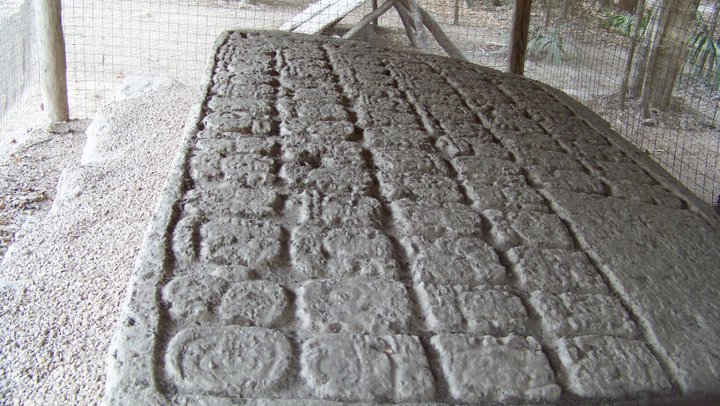
The Mayans had it absolutely right. This is a time of change, resurrection, new beginnings. This is not a time of doom and despair – unless you feed the fear monsters. There is definitely upheaval in the forecast – geological, astrophysical, and interpersonal. We are evolving as a species and we need to pay attention to the fact that we exist as one consolidated people of Earth. The time for political and economic separation is past, the future is all about moving forward as a planet of people not a collection of separated castes.

Change is good – embrace it, but understand what you are embracing. Making a political stand about economic fairness in the US… in Edmonton… is just missing the whole point. There *is* a need for social change and we *do* need to challenge our governments, but we need to challenge ourselves first. After all there really is no “them” there is only “us” because “we” are the government and “we” do have the power to change it, but only if we understand the change we are asking for and act on it by not supporting offensive companies and actively supporting those in need directly.

There will be massive political change in the next year in a global sense – of that I have no doubt. We have been stagnant as a race for too long. Europe is already feeling this and North America (the “new world”) is not far behind. The “Occupy” movement and the social unrest in the Middle East is merely a symptom, not a cause. Leaders will fail, people will rise and geopolitical fallout will be extreme, but the resulting global society will be stronger for it for an eon. So are you part of the problem or are you part of the solution?

Be awesome. Change the world.

Remembering 1976

The recent passing of Steve Jobs jarred open a lot of memories and emotion for me. While Jobs and I never actually met in person, our paths crossed numerous times and he had a profound affect on my life. Like many IT professionals my age, the late nineteen seventies was fertile ground for new inventions, creative thinking and imaginations spinning out of control. Steve Jobs was only one of the influential technology forces in my life at that time. Equally inspirational were Steve Wozniak, Allan Kay, Bill Gates, and Doug Bailey to name a few.

In 1976, I was an impressionable 10 year old living in British Columbia, Canada and had an interest in space, robots and fire trucks like any normal 10 year old boy. At the same time my uncle, Doug Bailey, was an ex IBM engineer who was also a curious inventor. Today we call people like him hackers, but back then he was just an engineer trying to figure out how some of this new emerging technology was going to affect people and work and lives. I was lucky enough to be hanging around his house one day when he was scavenging the keyboard out of an IBM Selectric 80 typewriter. He was building his own keyboard interface to replace the manual input switch panel on the Altair 8800. I remember asking how he knew that pressing a certain key could make a letter appear on the screen and he proceeded to explain binary and switch matrix logic over the next hour. I was hooked.

That summer Doug sold some of the first Apple I computers in white boxes as hobbyist kits out of H&S Micro Systems, his attempt to bring computers to the masses. The TRS-80, Apple II, and Commodore computers followed closely afterwards, along with a host of names no one remembers like Acorn, and Franklin. I spent part of the following summer visiting, hanging out at H&S, and generally ingesting all I could that was “computer”. The place was abuzz with hobbyists looking for the next cool thing, talking about “Home brew” computers and the future. There was a whole new world evolving between the Home Brew Computer Club and Xerox Parc. Altair, DEC, Intel, IBM, Microsoft, Apple… it was anybody’s game and people were writing new rules for it every day. When I look back on it now, it is hard to believe the revolution that was percolating around me.

The following year I sold one of the first IBM-PC’s, complete with 64Kb RAM and floppy drive. The retrofit 10Mb hard drive (yes that was megabyte) was an extra $3000 so it was not a popular item. I don’t have actual statistics, but at 13 years old I may have been the youngest computer sales person in Canada. That was about the time when the whole thing exploded. Everybody wanted to be part of the computer revolution. The TRS-80 in my bedroom was constantly in pieces and my soldering iron was always ready for the next home-brew project culled from the pages of Byte Magazine. With some inspiration from my brilliant uncle again, a modem was created and phone lines were hacked so I could rampage through BBS’s and the emerging FidoNet. I made some interesting connections and friendships “on-line” in those early BBS’s, some of whom went on to create or contribute to things like Netscape and the original MSN. If I had only known then what I know now about where those small projects were headed.

Today I look back in amazement at where we have come from and the changes that have taken us to where we are now. This week is my uncle’s birthday, and while I was thinking about his contribution to my IT career path, I received the news that Steve Jobs had passed away. In a heartbeat, a flood of memories stored away by a 10 year old came rushing to the surface. I sometimes wish I had done more in a creative sense to dramatically change the IT landscape, but I am satisfied with the number of other 10 your old minds I have infected with curiosity. I try to seize any opportunity to help kids explore IT whenever possible, mainly due to the impact of curious, creative men like them. If I can influence just one young mind to greatness, then I think the journey will have been worth it.

Be Awesome. Change The World.

Red, Black, and White Stripes

I was already a fan of The White Stripes, but I have just finished watching “Under Great White Northern Lights” and am now completely over the edge. If you have an hour and thirty five minutes to take in this great rockumentary, I highly recommend it. If you are Canadian and love music, it is an absolute must.

For those who have not yet been indoctrinated into the musical world of Jack and Meg White, YouTube “Hotel Yorba” or “Seven Nation Army” immediately. Jack White is quite possibly one of the most creative, original, musicians of our time. Meg and Jack manage to fill any space with a sound that should come from a full band of five or six, yet there really are only two of them on the stage. The raw, unfiltered emotion explodes in the form of bass beats and treble riffs that engulf you and wont let you go. Yeah, I’m a fan.

Jack and Meg broke up the band earlier this year much to the disappointment of their fans, but fourteen years is a long time to maintain that pace and it was time for something new. Their cutting edge music lives on in the fans that just wont let it go and new projects have them busy in new directions.

I think what I like most is their ability to break out of the constraints of the corporate music world, and the general constraints of society as we know it. They play what they feel, not what will sell and in the end, their honesty to themselves made them one of the best loved alternate music bands of the last decade.

Be Awesome – Change The World.

A few good men…

I did not realize how particularly unique my skill set was until I started the search for more people like me to help spread out work load. Before you think this is going down the line of an arrogant “I’m so awesome” rant, you should understand that I really don’t think so and I am certainly hoping it is not true. I need clones.

Actually, building a clone army is a pretty awesome thought, but really I just need a few good men, um… people… to share the work load. The company I spend most of my waking hours producing activity for is growing by leaps and bounds and our team just can’t keep up to the business volume. Sure, that’s a happy problem, but its still a problem.

The team I am part of work with some of the most brilliant minds on the planet and we are creating better, faster ways for other companies to market their products, deliver information and enable communication globally. I am one of five who demonstrate, integrate, and implement the fastest multi-protocol messaging system in the world. Five people who’s installed clients transport on the order of six billion digital messages every day. Five. We could use a little help.

Message Systems is approximately 100 brilliant engineers, marketing experts, sales professionals and software developers spread across 6 countries. We have installed products in the USA, Canada, China, India, UK, Brazil, France, Italy, etc, etc.. pick a country, the world loves us. We can transport digital messages to your email inbox or mobile phone or web browser or instant messenger and we can do it at over a million pieces per hour.. per server. We can do it in plain text or in vibrant full multi-media and we can save production costs at the same time.

With all that awesomeness, there is a need for some very special people to help us present it, sell it, integrate it, and support the customer through the early days of an implementation. While we also need sales people and software developers, I particularly am looking for what my friends and I call “the new renaissance men.” We need individuals who are just as comfortable in a sales presentation as they are writing a PERL script. They need to understand business operations and also have intimate knowledge of RFC2822 (and all its friends). These people can discuss the impact of the debt crisis effectively with a sales prospect over dinner, then sit down and write 200 lines of PHP or PERL or Python to demonstrate how our products can solve that client’s problems.

We are looking for entrepreneurial, self starters who have a passion for Information Technology. We are looking for that geeky kid who got laughed at in school for building a home made rocket complete with digital telemetry… until it worked. We need people who can learn a new programming language, write a script to demonstrate a function, and present it as a solution sale to a prospect… in 3 days.

These are the men and women of the new renaissance. They cross disciplines easily and consume information like water. They can write code, sell ice cubes to Eskimos, and have hobbies like painting or writing that are closer to professional work than hobby. They are often published writers, guest speakers, inventors, or that guy at the end of your block who can just fix anything.

If you are this person and you are stuck in a mindless code-monkey role and screaming to get out. Please contact me. If you know someone like that please forward this to them. If you live with this person, do them and yourself a favour and put this in front of them. We need clones.

Send me your resume and I will get it to the right person. You can review the current official career posting here or just go to www.messagesystems.com/careers and take a look at some of the other positions we have open. We are looking for the best, brightest individuals. We don’t need 100 generic people to pound keyboards we just need a few good miracle workers.

Be awesome. Change the world.

Fixing my Keurig B60 coffee maker

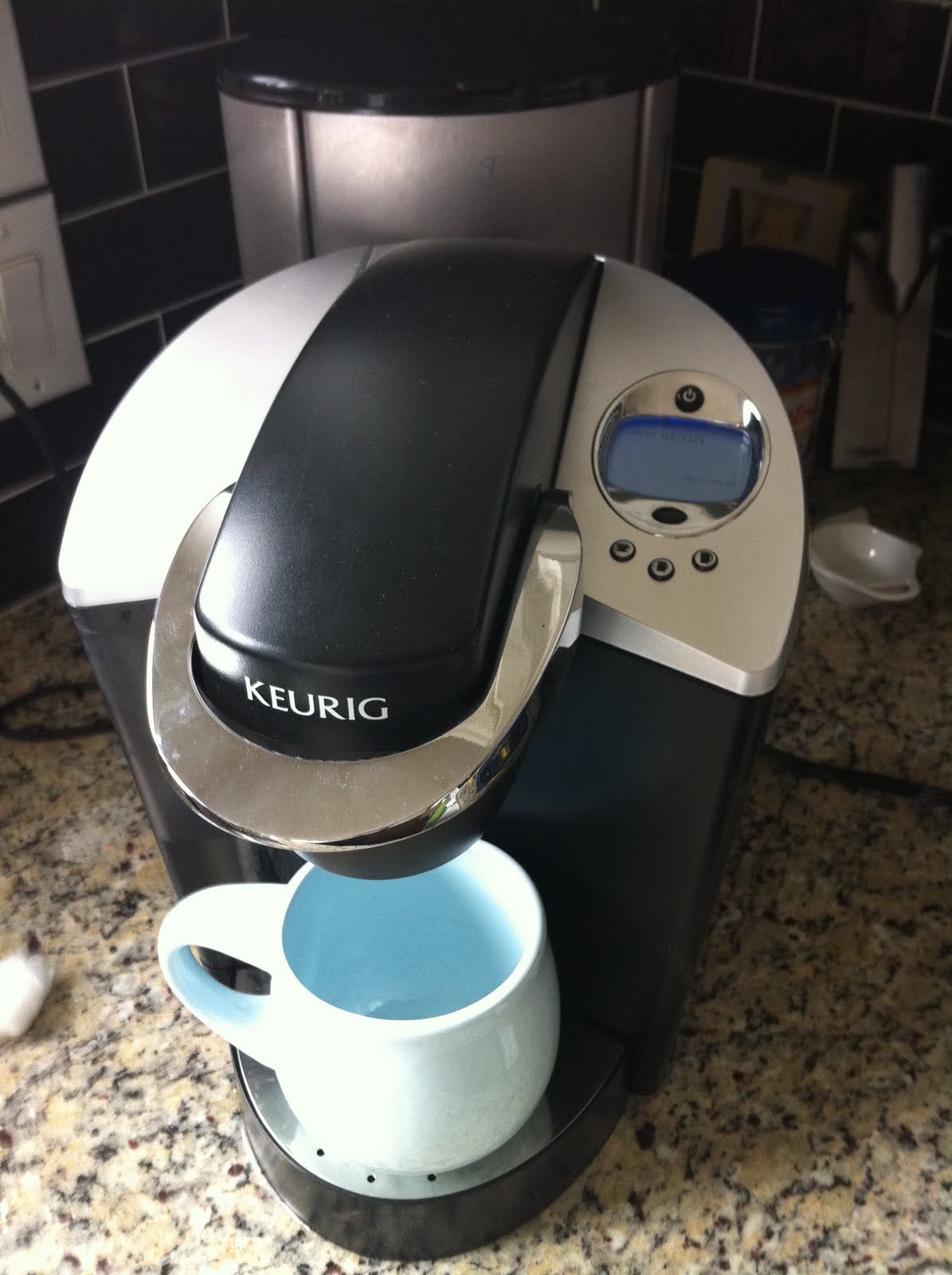
I love my Keurig B60 coffee maker but every once in a while it fails me. I am not the only one, Google is full of searches for “how do I fix my Keurig coffee maker”. Most of the time I can slip in a coffee packet (K-Cup), push the button and get a perfect cup of coffee. However after a few months of stellar performance, it will sometimes sputter and die with only a few teaspoons of coffee in my cup 😦

There are several different symptoms and fixes with these things. Lets make sure you are fixing the right thing here.

Symptom 1: Coffee brews and pours into a mug, but makes less than expected. This gets progressively worse and can get down to a trickle.
Fix: This is most likely just water scaling from hard water. You should descale the machine first and if that does not fix it, try my fix below.

Symptom 2: Water will not draw from the tank to fill the maker.
Fix: This is again a scaling issue and the Machine should be descaled, but you will want to clean the water intake in the base of the machine with a vibrating or ultrasonic toothbrush first.

Symptom 3: Coffee was brewing normally, then suddenly stops. Water seems to draw from the tank then cycles out just as quickly but never pours any coffee.
Fix: This is most likely a clogged dispensing valve which is what I am fixing in the instructions below. This can happen from hard water build up but it is more often caused by coffee grounds getting lodged in the valve.

I have taken this little guy apart a few times to fix it and I thought I would share how in case you have one of these too. The B50 through B100 seem to have similar architecture so it should be similar for most of those models but this one is specifically a model B60.

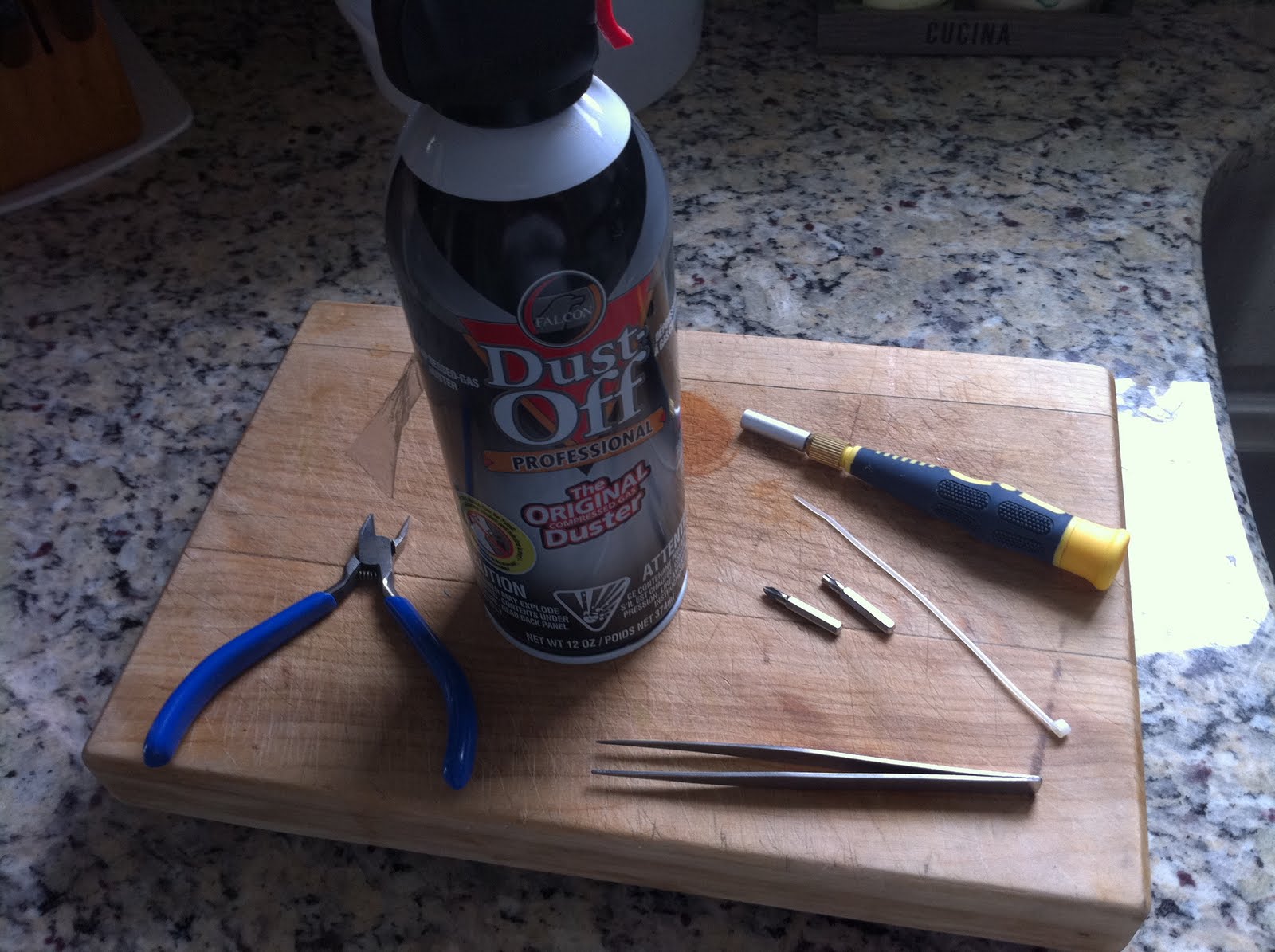
What you will need:
#1 Phillips screwdriver
#15 Torx driver
canned air
long tweezers
small cable tie
cable snips
Broken Keurig B60 Coffee Maker

Unplug it. There are heaters, pumps, sensors, etc here that are powered and could be potentially dangerous. Right under the top cover there are a few sensors and switches as well, so unplugging first is prudent. It is also important to remove any coffee packet that may be left in the machine and leave it out until the fixing and cleaning is done.

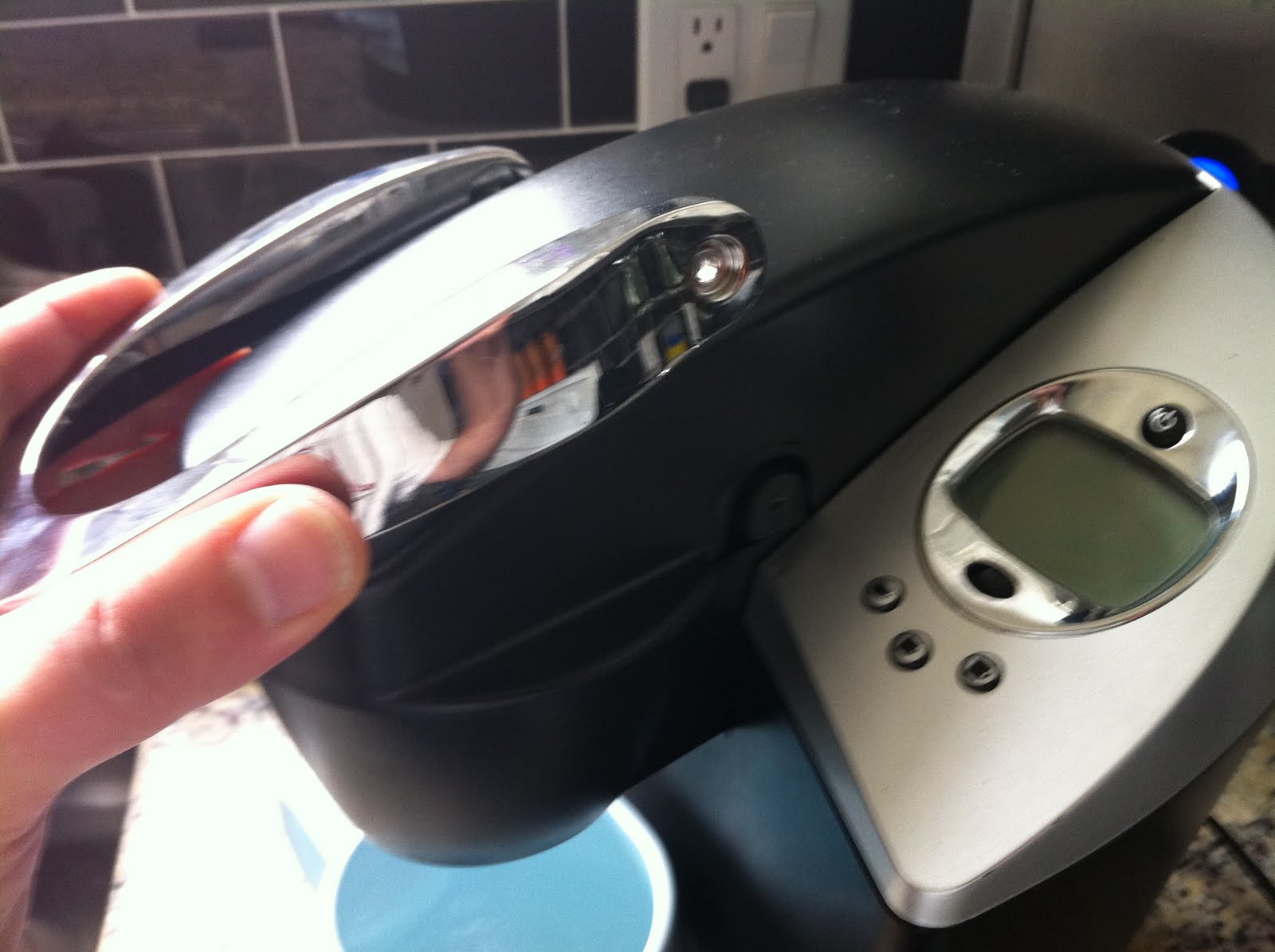
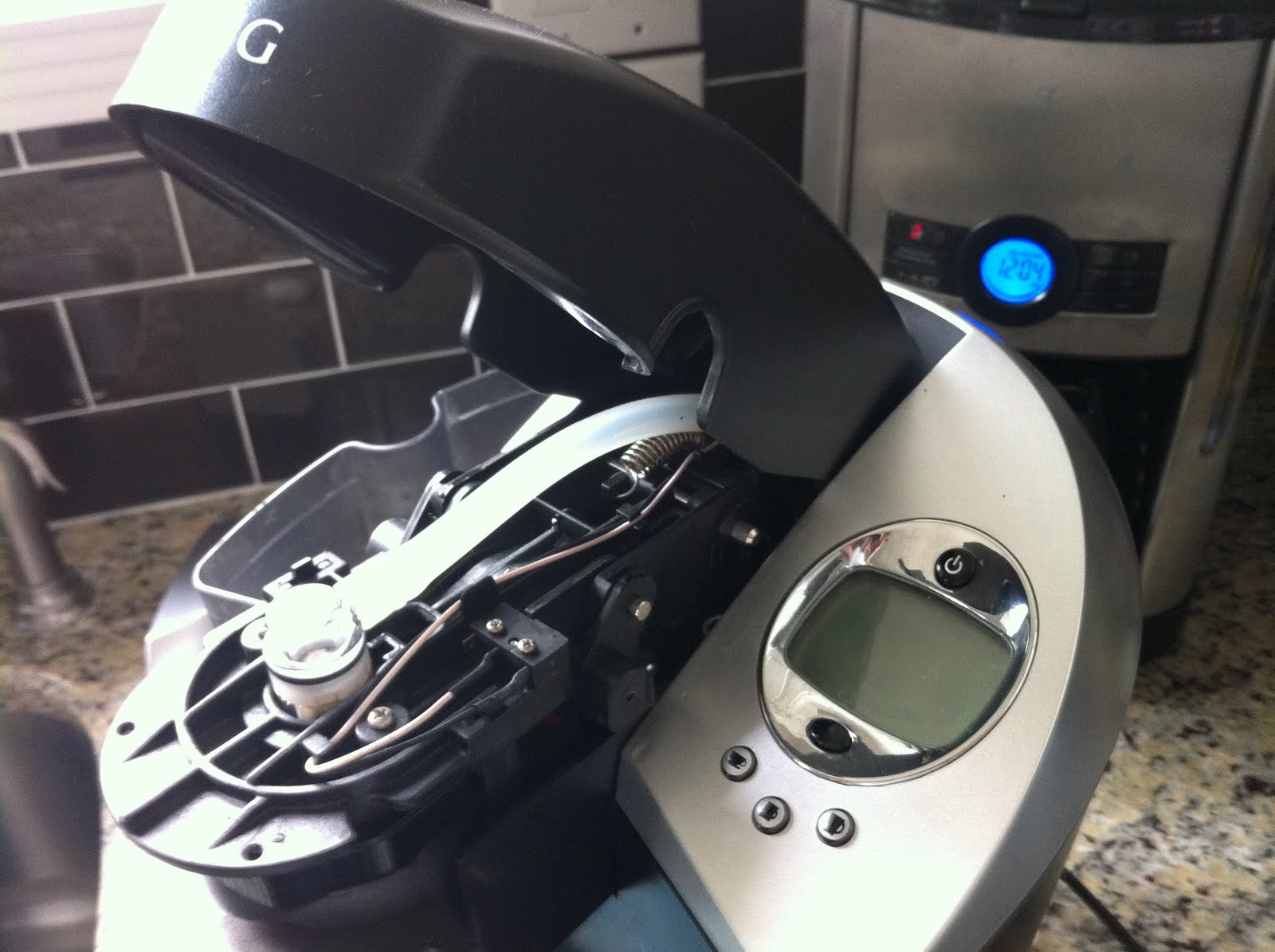
Remove the top access handle. Remove the two Torx screws at the handle pivot points. Before you lift the handle off, use it to open the top like you are going to load it. Now take the handle off.

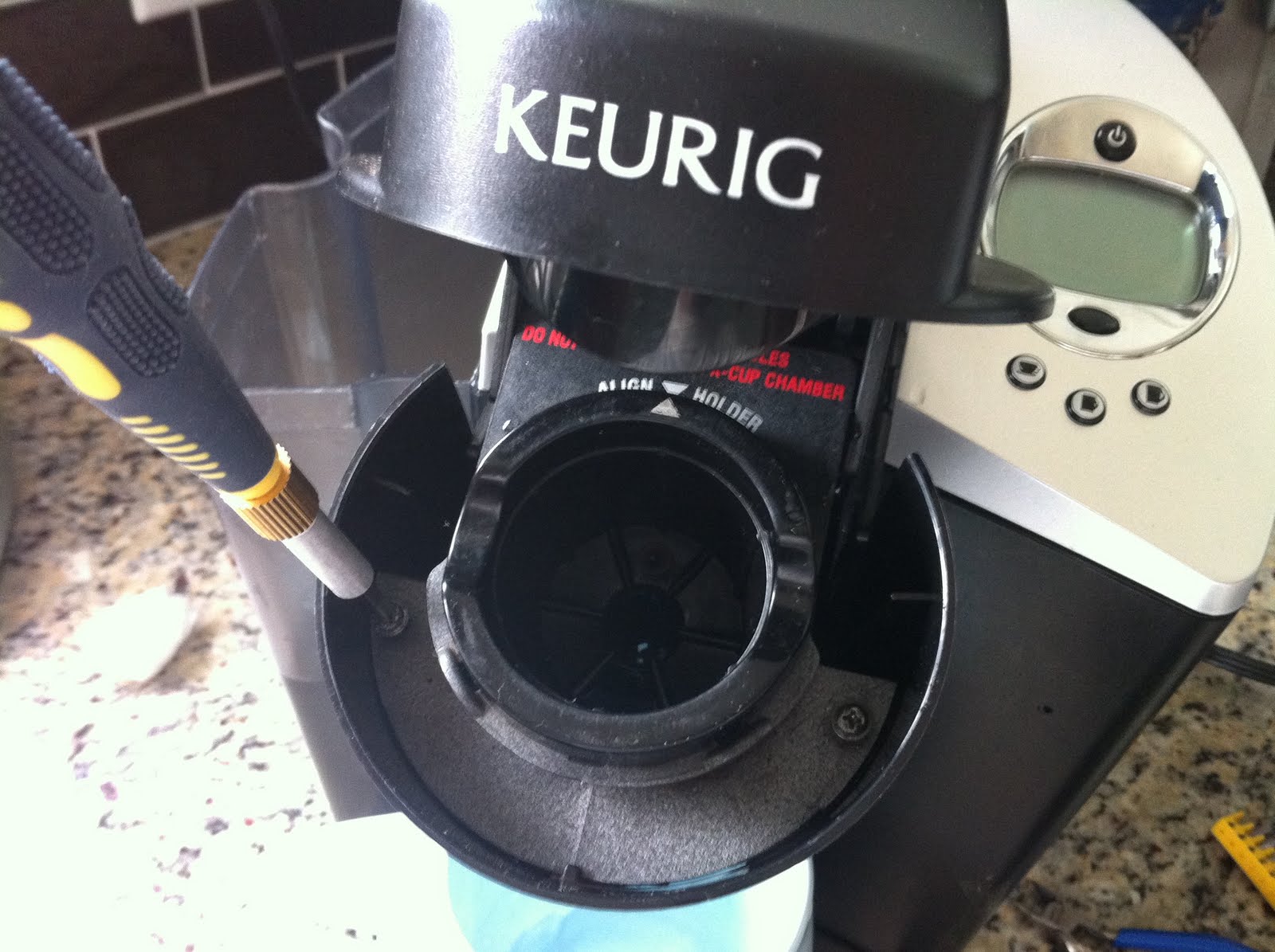
Remove the lower cover. There are two black screws holding that in place. This just gives you room to get to the upper screw you need to remove next.

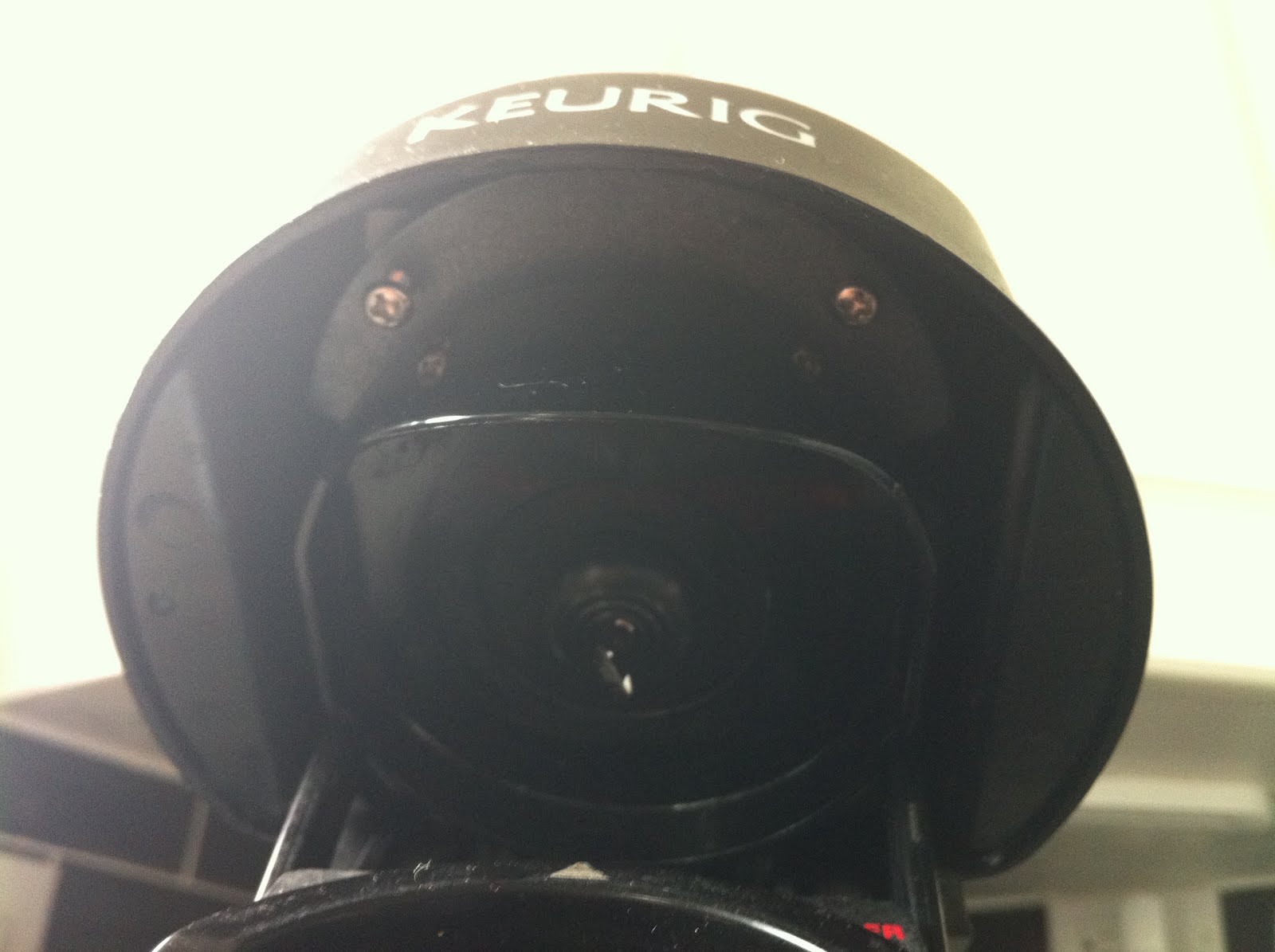
Looking up under the front of the top cover, there are two silver screw – remove them. Be careful with these as they are easy to drop and lose. It is a good idea to use long tweezers for taking these out and re-installing them as well.

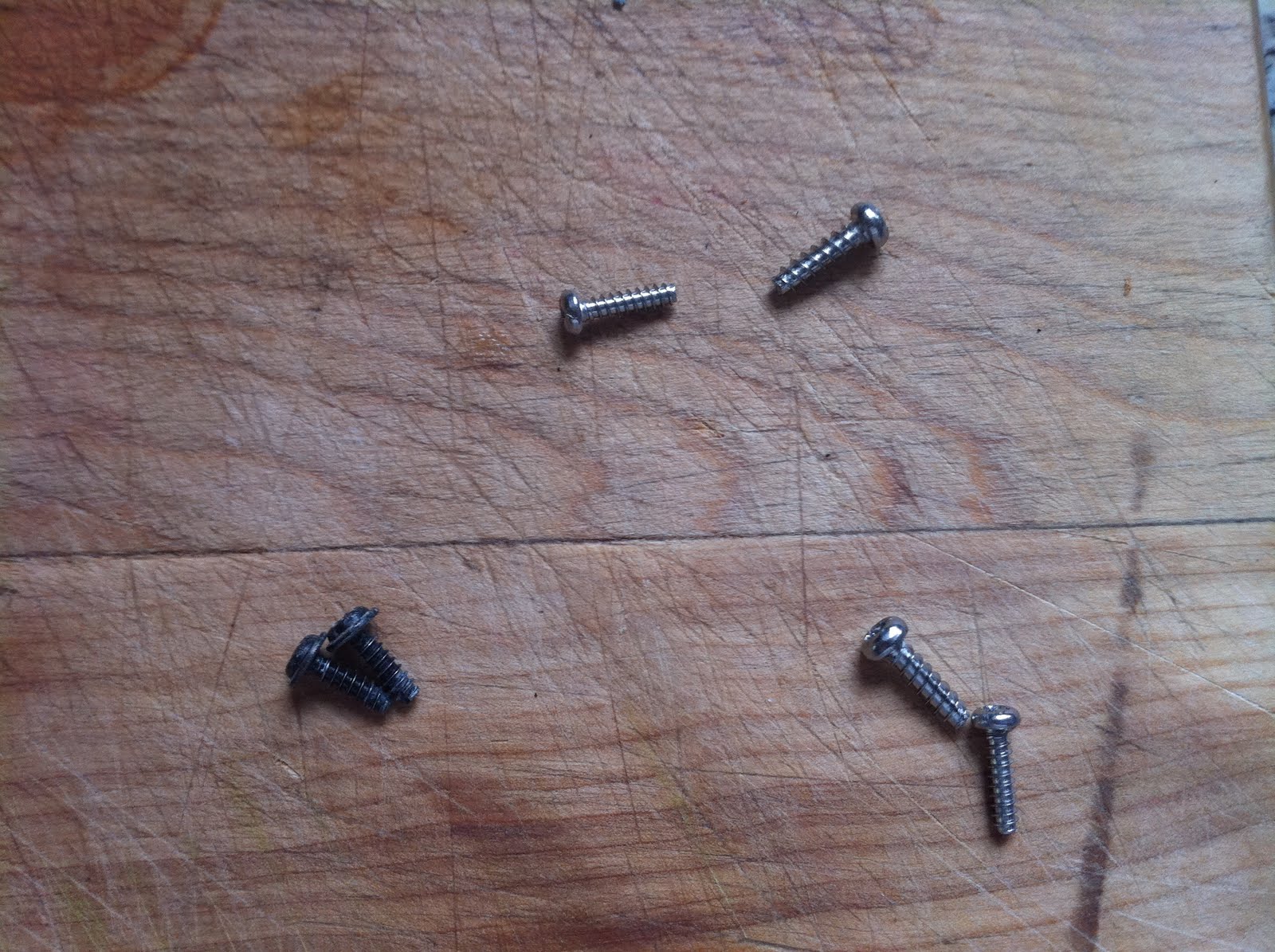
You should now have 3 sets of screws – don’t mix them up.

Push the hood back and lift – it should come off easily. If it gives you any resistance, you probably have it open too far, close the top slightly and push back, then lift.

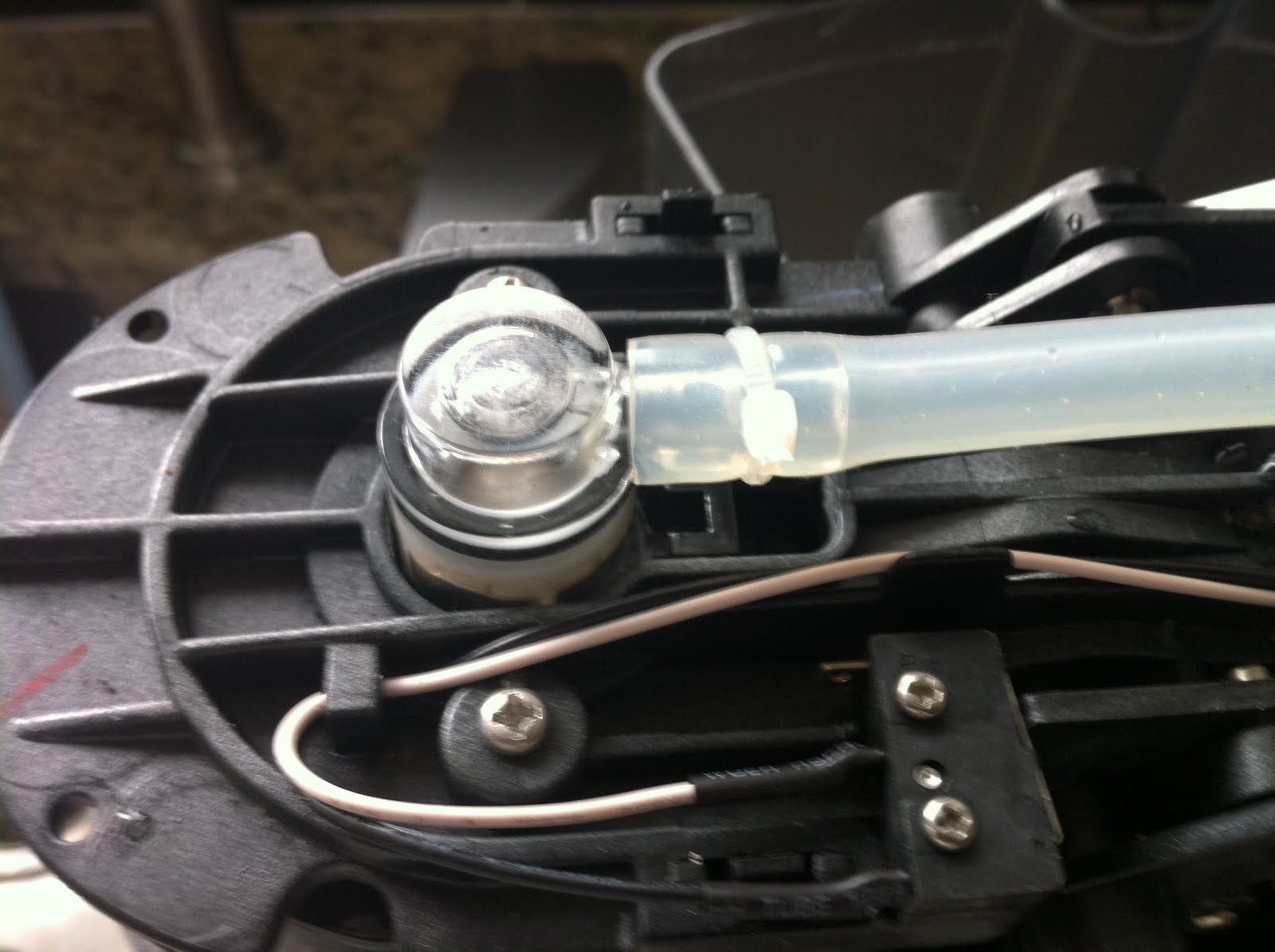
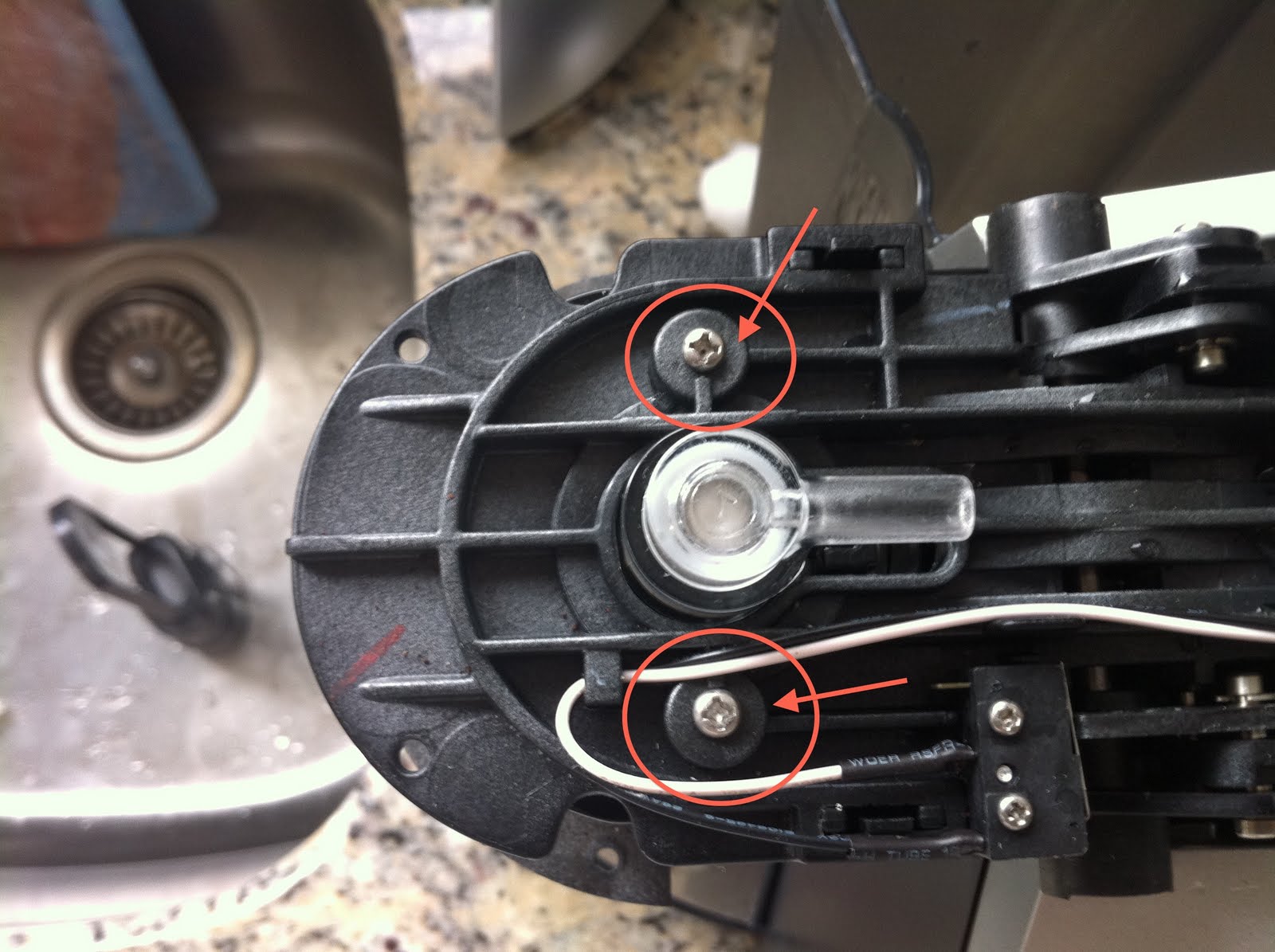
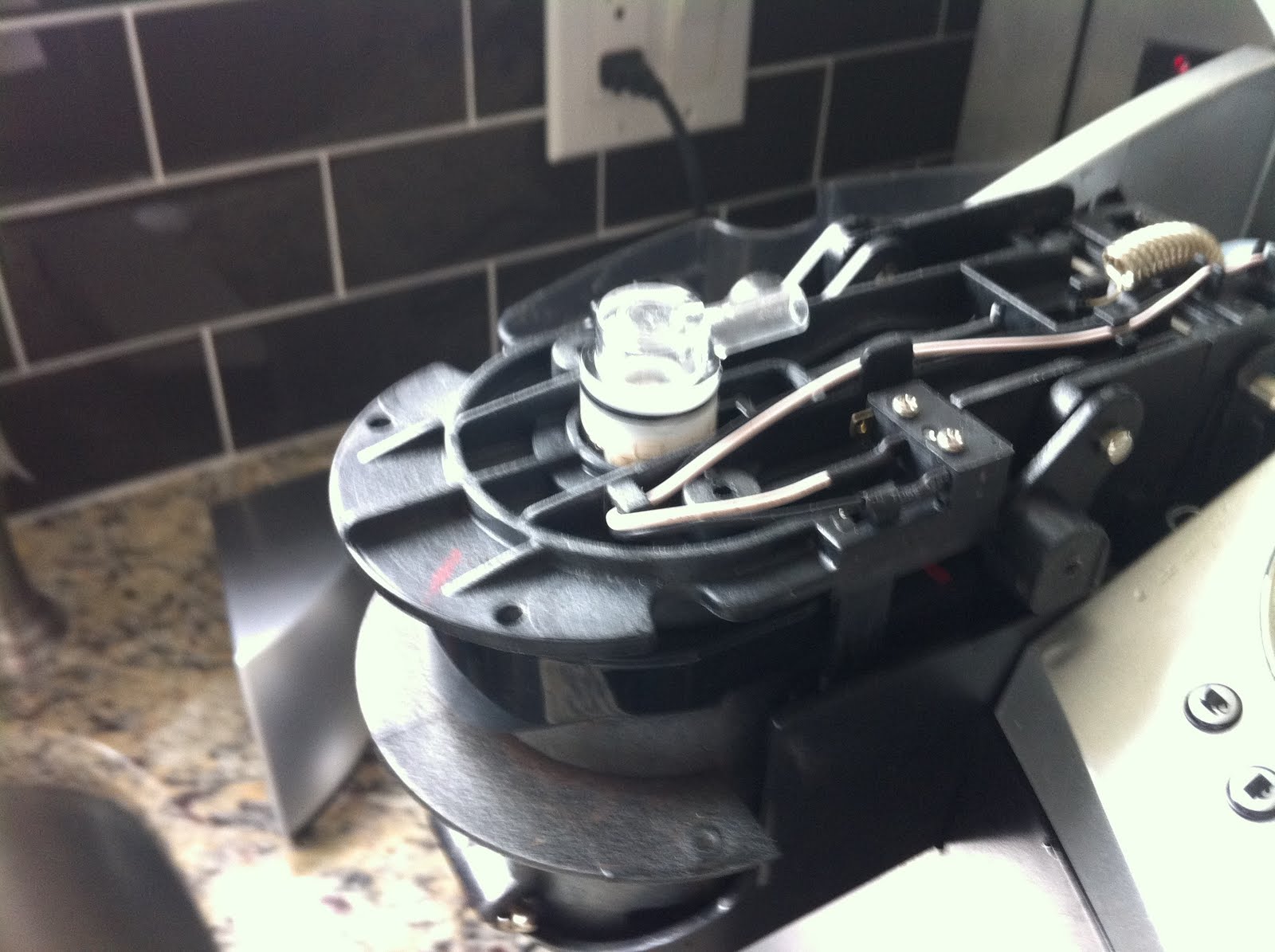
At the front of the unit there is a hose that terminates into a valve that eventually injects hot water into the coffee packet. Carefully snip the cable clamp and remove the hose.

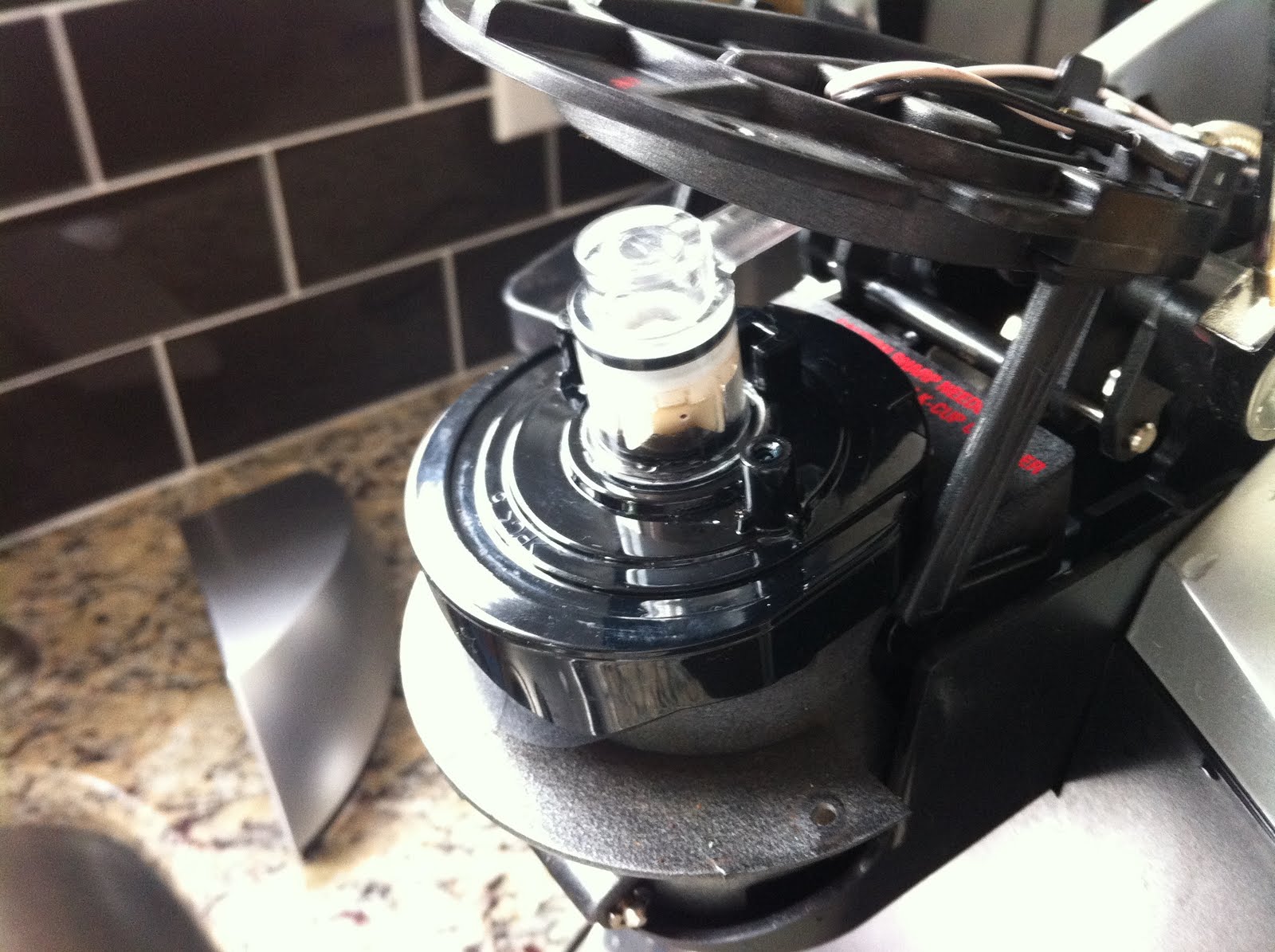
There are two silver screws holding this valve in place, remove them and the whole assembly will drop out.

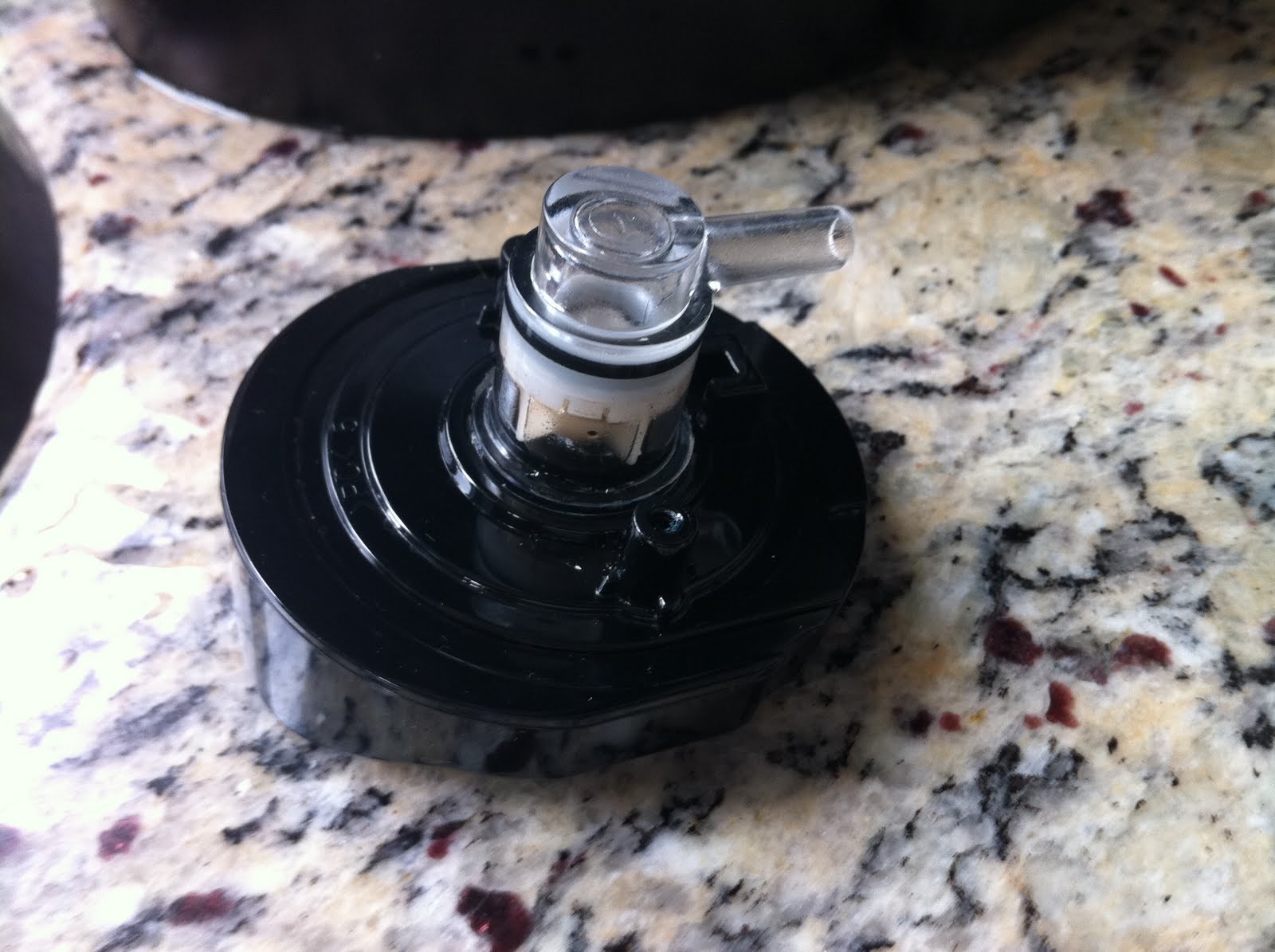
Clean out the outlet side with caned air or high pressure water. Be careful, this is really sharp and is normally the part that pierces the top of the coffee packet so it can just as easily pierce your hand.

If this is the problem you will likely find bits of coffee or hard water deposits built up in here. after it is cleaned out you should be able to blow air through from the hose connected side easily.

Reassemble in the reverse direction. Attach valve, then hose and cable tie. Screw in the upper cover (may need tweezers for this), then the lower. Screw in the access handle.

Now plug it back in and run it without a coffee packet so that clean water flows through the system. You may want to also take this opportunity to descale your Keurig and if you have hard water like we do, use an electric toothbrush (the vibrating kind) to clean out the water intake.

You should now have a working coffee maker again.

A robot that can make robot parts… and other stuff

I saw this on the Colbert Report last night (thanks Stephen) and I have to (*have to*) have one! I can not believe I have not seen this in my news feeds yet. Every robot building shop needs one of these.

What am I ranting about? The Maker Bot Thing-O-Matic! [http://www.makerbot.com/]

This thing is tres cool, mon ami. Of course it makes other stuff too, but the first thing I imagined when I saw this on Colbert was custom gears sets, then the elusive artificial Phalanges I have been wanting to mould, then my mind went crazy with possibilities.

If you are a gear-head (robot builder/hacker) then you have probably come across the situation where the gear set on the motor in your hand is not the one you need. The search begins to find a replacement gear that will give you the reduction you need, but hours of driving between scrap yards and surplus stores yields nothing. Now, you can just make one.

In fact, you can make just about anything. Gears, hinges, struts, eyelids, shields, faceplates, actuators, fingertips, grippers, spacers, levers, buttons, bumpers, and more.

The alternative has been the CNC milling machine where you can cut the shape you need out of a block of material. There are desktop varieties like this one but they are expensive and can waste a lot of material. The Maker Bot Thing-O-Matic creates an object from scratch using hard plastic thread feed. This is the same plastic used to make Lego and when was the last time you broke one of those?

For $1300 USD, this is a must-have for any custom developer / bot-hacker / gear-head shop.

Be awesome. Change the world.

It’s the end of the world as we know it

According to Harold Camping’s 2011 end times prediction, the rapture begins tomorrow May 21st at 6PM precisely. Pack appropriately and don’t be late or you will miss the bus.

If you are not already marked as one of the 200 Million select pre-millennial Christians signed up for the rapture, please disregard the above notice – you are going to burn in the aftermath … or you will be able to make your tee-off time at the club – the prediction is not really clear for the non believers. In any case the rapture is apparently scheduled for Saturday at 6PM so it will be very convenient for everyone to make it and not miss any work in case Mr. Camping is wrong… again.

If you ARE planning on being all rapture’d up and accepted into the heavenly fold on Saturday, it is not too late to take care of those you leave behind. You can always sign over the deed to your house to me and I will make sure it is appropriately used to house the sadly fallen remnants of this world. After all, you will not be needing it after 6:01PM Saturday anyway. That goes for your cars and bank accounts too. Really. Honest. I will make sure your no-longer-needed worldly possessions are well taken care of. Just write up a quick note saying that all your worldly possessions will be signed over to Tom Mairs as of May 22nd 2011, and send that with copies of your property deeds and vehicle insurance to me. Really, I promise.

Lou Reed’s “Busload of Faith” plays in the background as I write this. Ominous?

I was recently in the Mayan Riviera and had a chance to talk with locals about the December 2012 predictions, end-of-the-world issues, and misconceptions. Apparently Hollywood is good for business but they don’t listen very well. I am looking forward to the sunset season of 2012 and the dawning of a new age as they have predicted. Quite frankly I am more apt to believe Mayan scholars over crackpots like Harold Camping. In the later case, I think there is a misinterpretation where “end of the world” should be read “end of the way we live”. There is definitely something afoot in the universe, but I prefer to think it is a good thing, not the fire and brimstone version.

Of course, Canadians have known about the end of the world for a while – just ask the boys of Great Big Sea. It’s all a matter of perspective. Take a pill Harold, the world will still be spinning on Sunday so you can go to church and apologize to everyone. If I am wrong, …well, …it’s been a great ride. 🙂

Be awesome. Change the world.

Website Powered by WordPress.com.

Up ↑